
Key Specifications
Display
6.90-inch
Front Camera
12-megapixel
Rear Camera
200-megapixel + 50-megapixel + 50-megapixel + 10-megapixel
RAM
12GB
Storage
256GB
Battery Capacity
5000mAh
OS
Android 16
Resolution
1,440x3,120 pixels
View Full Specs >
Samsung Galaxy S26 Ultra FAQs
Frequently Asked Questions
What are the main features of the Samsung Galaxy S26 Ultra?
The Samsung Galaxy S26 Ultra is available with 16GB of RAM paired with 512GB of internal storage, along with 12GB of extended RAM support. It features a dual rear camera setup comprising a 200MP main camera, a 50MP ultrawide, and 50MP 10MP telephoto cameras, along with a 12MP front-facing selfie camera. The phone supports fast charging with 60W wired charging and 25W wireless charging, backed by a 5000mAh battery. It is powered by the Snapdragon 8 Elite Gen 5 for Galaxy processor and comes with a 6.9-inch QHD Dynamic AMOLED 2X display that supports up to a 120Hz refresh rate. The Samsung Galaxy S26 Ultra is available in 4 colour options.
When was the Samsung Galaxy S26 Ultra released?
The Samsung Galaxy S26 Ultra was launched on February 25, 2026
Where can I buy the Samsung Galaxy S26 Ultra?
You can buy the Samsung Galaxy S26 Ultra through the official Samsung website, e-commerce platforms such as Amazon, and select retail stores across India.
What are the different storage and RAM options available?
The Samsung Galaxy S26 Ultra is available with 16GB of RAM paired with 1TB of internal storage, along with 12GB of extended RAM support.
What is the camera on the Samsung Galaxy S26 Ultra?
The Samsung Galaxy S26 Ultra has a 200MP OIS main rear camera paired with a 50MP ultra-wide, 50-megapixel periscope telephoto, and 10-megapixel telephoto sensor on the back, and a 12MP front-facing selfie camera.
Does the Samsung Galaxy S26 Ultra support fast charging?
Yes, the Samsung Galaxy S26 Ultra supports fast charging with 60W wired charging and 25W wireless charging, backed by a 5000mAh battery.
What processor is in the Samsung Galaxy S26 Ultra?
The Samsung Galaxy S26 Ultra is powered by the Snapdragon 8 Elite Gen 5 for Galaxy processor.
What is the screen size and display type?
The Samsung Galaxy S26 Ultra has a 6.9-inch QHD Dynamic AMOLED 2X display with up to a 120Hz refresh rate.
Is the Samsung Galaxy S26 Ultra waterproof?
The Samsung Galaxy S26 Ultra has an IP68 rating for splash, water, and dust resistance.
Does the Samsung Galaxy S26 Ultra have a headphone jack?
No, the Samsung Galaxy S26 Ultra does not have a 3.5mm headphone jack.
What new colours are available for the Samsung Galaxy S26 Ultra?
The Samsung Galaxy S26 Ultra is available in Sky Blue, White, Cobalt Violet, Black colour options.
Does the Samsung Galaxy S26 Ultra support a physical dual SIM or eSIM?
Yes, the Samsung Galaxy S26 Ultra supports both physical dual SIM and eSIM cards.
How many years of software updates will the Samsung Galaxy S26 Ultra get?
The Samsung Galaxy S26 Ultra is expected to receive 7 years of Android OS updates and 7 years of security updates.
Can I expand the storage with a microSD card on the Samsung Galaxy S26 Ultra?
No, the Samsung Galaxy S26 Ultra supports expandable storage via a microSD card.
Can I enable Privacy Display for specific apps on the Samsung Galaxy S26 Ultra?
Yes, you can enable Privacy Display for specific apps on the Samsung Galaxy S26 Ultra
Is Privacy Display an integrated panel layer or an external accessory on the Samsung Galaxy S26 Ultra?
Privacy display is an integrated panel layer on the Samsung Galaxy S26 Ultra
What are the quick shortcuts for enabling or disabling Privacy Display on the Samsung Galaxy S26 Ultra?
You can quickly enable or disable Privacy Display on the Samsung Galaxy S26 Ultra through the Quick Panel. Simply swipe down from the top right of the screen and tap the Privacy Display icon to turn it on or off. You can also tap the Privacy Display text area in the Quick Panel to access detailed settings and configure automatic conditions
Is the Privacy Display feature safe for individuals with specialised polarised eyewear?
Yes, the Privacy Display feature is generally considered safe for individuals using specialised polarised eyewear
Does the Samsung Galaxy S26 Ultra support adaptive refresh rate?
Yes, the Samsung Galaxy S26 Ultra supports an adaptive refresh rate up to 120Hz
Is the Samsung Galaxy S26 Ultra suitable for outdoor visibility?
Yes, the Samsung Galaxy S26 Ultra is suitable for outdoor visibility with a peak brightness of 2600 nits
Does the Samsung Galaxy S26 Ultra support Vision Booster?
Yes, the Samsung Galaxy S26 Ultra supports Vision Booster
Does Privacy Display on the Samsung Galaxy S26 Ultra affect brightness?
Yes, the Privacy Display feature on the Samsung Galaxy S26 Ultra can affect how the screen looks. When enabled, it primarily uses Narrow Pixel technology, which may make the display’s pixel density (PPI) seem slightly lower, though it still stays above Retina Display standards. In indoor environments, screen brightness remains similar to Normal Mode. However, in brighter surroundings, the display may appear dimmer compared to Normal Mode due to the Narrow Pixel operation.
In what use cases is the built-in Privacy Display recommended?
The built-in Privacy Display on the Samsung Galaxy S26 Ultra is ideal for situations where you want to keep your screen content private from people around you. It helps protect sensitive information by limiting side-angle viewing, making it useful in public places, offices, meetings, travel, or crowded environments. You can use Privacy Display to hide your entire screen, or selectively protect specific content such as apps and incoming notifications. With customisable controls, you can decide what stays private and when to share your screen content.
What type of display does the Samsung Galaxy S26 Ultra have?
The Samsung Galaxy S26 Ultra has a Dynamic LTPO AMOLED 2X display
Does the Samsung Galaxy S26 Ultra support HDR content?
Yes, the Samsung Galaxy S26 Ultra supports HDR content
Can I adjust the colour profile on the Samsung Galaxy S26 Ultra?
Yes, you can easily adjust the colour profile on the Samsung Galaxy S26 Ultra
Does the Samsung Galaxy S26 Ultra have an anti-glare display?
Yes, the Samsung Galaxy S26 Ultra features an anti-glare display with anti-reflective coating on its Gorilla Armor glass which helps in reducing reflection and improves visibility in bright sunlight.
Does the Samsung Galaxy S26 Ultra support slow-motion video?
Yes, the Samsung Galaxy S26 Ultra supports up to 240fps slow-motion video
What is the ProVisual Engine on the Samsung Galaxy S26 Ultra?
The ProVisual Engine on the Samsung Galaxy S26 Ultra is an AI-powered imaging technology designed to enhance photo quality. Paired with the 200 MP wide camera sensor, it analyses high-resolution image data in real time to preserve sharp details, rich textures, and overall clarity across the scene, delivering vibrant, natural, and true-to-life photos.
What is Super Steady mode on the Samsung Galaxy S26 Ultra?
Super Steady mode on the Samsung Galaxy S26 Ultra is designed to capture smooth and stable videos, even during fast movement or action-packed moments. By using advanced stabilization technology, it minimizes shakes and vibrations, delivering footage that looks as steady as if it were recorded with a gimbal or dedicated stabilizing device
What is horizontal lock in Super Steady mode on the Samsung Galaxy S26 Ultra?
The Horizontal lock feature in the Samsung Galaxy S26 Ultra Camera app stabilizes videos during movement, keeping the horizon level even during 360-degree rotations.
Does the Samsung Galaxy S26 Ultra support Nightography?
Yes, the Samsung Galaxy S26 Ultra supports Nightography.
Is the Galaxy S26 Ultra suitable for content creators?
Yes, the Samsung Galaxy S26 Ultra is suitable for content creators.
Does the Samsung Galaxy S26 Ultra support RAW photography?
Yes, the Samsung Galaxy S26 Ultra supports RAW photography.
Can the Samsung Galaxy S26 Ultra record in 4K at 120fps?
Yes, the Samsung Galaxy S26 Ultra record in 4K at 120fps
What is the periscope telephoto lens on the Samsung Galaxy S26 Ultra?
The Samsung Galaxy S26 Ultra has a 50-megapixel periscope telephoto lens
What AI camera features does the Samsung Galaxy S26 Ultra offer?
The Samsung Galaxy S26 Ultra offers advanced AI camera features that includes intelligent tools like AI Image Signal Processor for sharper details, Photo Assist for easy photo editing, Nightography Video for clearer low-light videos, and Audio Eraser to reduce unwanted background noise.
Can I use the Samsung Galaxy S26 Ultra as a professional video camera?
Yes, you can absolutely use the Samsung Galaxy S26 Ultra as a professional video camera.
What are the major Galaxy AI features available on the Samsung Galaxy S26 Ultra?
The Samsung Galaxy S26 Ultra is delivering smarter tools for creativity, productivity, and everyday convenience. Key features include Photo Assist for advanced photo editing, Creative Studio for custom content creation, Now Nudge and Now Brief for personalised updates and suggestions, Document Scan for cleaner document captures, and Bixby for natural voice assistance.
How many years of security updates does the Samsung Galaxy S26 Ultra receive?
The Samsung Galaxy S26 Ultra is promised to receive 7 years of security updates.
What user interface and Android version does the Samsung Galaxy S26 Ultra run?
The Samsung Galaxy S26 Ultra runs on One UI 8.5 based on Android 16.
Does the Samsung Galaxy S26 Ultra support Google Assistant and Gemini?
Yes, the Samsung Galaxy S26 Ultra supports Google Assistant and Gemini.
Does the Samsung Galaxy S26 Ultra support AI-powered live translation?
Yes, the Samsung Galaxy S26 Ultra support AI-powered live translation
Does Bixby now feel more conversational than before on the Galaxy S26 Ultra?
Yes, Bixby now feels more conversational than before on the Galaxy S26 Ultra
What is the Now Brief feature on the Samsung Galaxy S26 Ultra?
The Now Brief feature on Samsung Galaxy S26 Ultra is an AI-powered daily summary that shows important updates in one place. It helps you stay organised without opening multiple apps.
What is the new Creative Studio feature on the Samsung Galaxy S26 Ultra?
The new creative studio in Samsung Galaxy S26 Ultra allows users to generate or edit digital art without using any third-party apps.
Can Creative Studio be accessed directly from within productivity apps like Samsung Notes on the Samsung Galaxy S26 Ultra?
Yes, the Creative Studio can be accessed directly from within productivity apps like Samsung Notes on the Samsung Galaxy S26 Ultra
How does AI Select work with the S Pen on the Galaxy S26 Ultra?
With the S Pen on the Galaxy S26 Ultra, AI Select lets you select content on your screen and interact with it easily. You can draw on selected items, create images, or make GIFs. It can be accessed through the Air Command menu using the S Pen.
How does AI-powered Call Screening protect users from disruptions on the Samsung Galaxy S26 Ultra
In Samsung Galaxy S26 Ultra, the AI-powered call screening allows the Call assistant to answer calls and ask the caller who they are and why they're calling, which helps in easy bifurcation of important calls, hence leading to fewer disruptions.
How does Audio Eraser work on the Samsung Galaxy S26 Ultra?
Audio Eraser uses AI to identify different sounds in videos and reduce unwanted background noise, resulting in clearer audio.
Can Galaxy AI improve photo editing on the Samsung Galaxy S26 Ultra?
Yes, Galaxy AI can easily improve photo editing on the Samsung Galaxy S26 Ultra using features like Generative edit and Edit suggestions.
What NPU improvements does the Samsung Galaxy S26 Ultra offer?
The Samsung Galaxy S26 Ultra comes with an upgraded NPU that is 39 percent more powerful for faster AI performance. It helps improve images and visuals in real time across apps and supports smoother multitasking, gaming, and Galaxy AI features.
Can the Galaxy S26 Ultra handle multitasking efficiently?
Yes, the Galaxy S26 Ultra can easily handle multitasking very efficiently.
What storage options are available on the Samsung Galaxy S26 Ultra?
The Samsung Galaxy S26 Ultra comes with internal storage of 256GB storage, 512GB, and 1TB
What are the memory options available with the Samsung Galaxy S26 Ultra?
Galaxy S26 Ultra comes with different storage options: 16 GB, and 12 GB of memory, so you can choose the capacity that fits how you use your phone.
Does the Samsung Galaxy S26 Ultra support expandable storage?
No, the Samsung Galaxy S26 Ultra does not support expandable storage .
How does the Samsung Galaxy S26 Ultra handle thermal management during heavy use?
The Samsung Galaxy S26 Ultra is designed to perform smoothly in different temperatures. During heavy use, it may get warm, but its large vapour-chamber cooling system helps manage heat.
What connectivity options does the Samsung Galaxy S26 Ultra support?
The Samsung Galaxy S26 Ultra supports multiple connectivity options, including USB Type-C (USB 3.2 Gen 1), Wi-Fi 7, Bluetooth 6.0, NFC, and UWB (Ultra Wideband). It also offers location services like GPS, Glonass, Beidou, Galileo, and QZSS for accurate navigation and supports Wi-Fi Direct for easy device sharing.
Does the Samsung Galaxy S26 Ultra support Samsung DeX?
Yes, the Samsung Galaxy S26 Ultra supports Samsung DeX.
Does the Galaxy S26 Ultra offer a 512GB storage option?
Yes, the Galaxy S26 Ultra offers a 512GB storage option
Is the Galaxy S26 Ultra suitable for users who store large files?
Yes, the Galaxy S26 Ultra is suitable for users who are looking to store large files. It is available with up to 1TB capacity.
Can I mirror my Samsung Galaxy S26 Ultra to a TV?
Yes, you can mirror your Samsung Galaxy S26 Ultra to a TV. It lets you share photos, videos, games, and presentations from your phone to a bigger screen for a better viewing experience.
Is the Samsung Galaxy S26 Ultra a good gaming phone?
Yes, the Samsung Galaxy S26 Ultra can be considered as a good gaming phone.
Does the Samsung Galaxy S26 Ultra support higher frame rates in games?
Yes, the Samsung Galaxy S26 Ultra supports higher frame rates in gaming which is up to 120fps
Is the Galaxy S26 Ultra a good phone for competitive gaming?
The Galaxy S26 Ultra can be considered as the decent gaming phone for the competitive gamers.
Does the Samsung Galaxy S26 Ultra support console-quality gaming experiences?
No, the Samsung Galaxy S26 Ultra does not support console-quality gaming experience.
Can the Samsung Galaxy S26 Ultra handle graphically demanding games smoothly?
Yes, the Samsung Galaxy S26 Ultra handles graphically demanding games smoothly.
Is touch latency improved on the Galaxy S26 Ultra for gaming?
Yes, the Samsung Galaxy S26 Ultra supports up to 240Hz touch sampling rate for smooth responsiveness during gaming.
Does the Samsung Galaxy S26 Ultra support ray tracing in games?
Yes, the Samsung Galaxy S26 Ultra has hardware-accelerated ray tracing support for realistic lighting, shadows, and lifelike reflections.
Does the Samsung Galaxy S26 Ultra have all the necessary features for a seamless cloud gaming experience?
Yes, the Samsung Galaxy S26 Ultra has all the necessary features. Features like a 6.9-inch Dynamic AMOLED 2x display, Snapdragon 8 Elite Gen 5 chip, and Wi-Fi 7 enable a seamless cloud gaming experience.
Does Samsung optimise popular games on the Galaxy S26 Ultra?
Yes, popular games are optimised on the Samsung Galaxy S26 Ultra. This is made possible due to features like Vulkan API support, ray tracing, and Game Booster
What is the battery capacity of the Samsung Galaxy S26 Ultra?
The Samsung Galaxy S26 Ultra comes with a 5000mAh battery .
Does the Samsung Galaxy S26 Ultra support fast charging?
Yes, the Samsung Galaxy S26 Ultra supports 60W fast charging and 25W wireless charging.
What is Wireless PowerShare on the Samsung Galaxy S26 Ultra?
With this PowerShare feature of Samsung Galaxy S26 Ultra, you can charge a compatible phone, smartwatch, or earbuds by placing them on your Galaxy phone.
Can I check my battery health on the Samsung Galaxy S26 Ultra?
Yes, you can check the battery health on the Samsung Galaxy S26 Ultra either via the Battery Information page in Settings or via the Phone diagnostics feature in the Samsung Members app. This tool helps you regularly monitor your battery condition without visiting a Samsung Service Centre and quickly identify any potential issues.
How does the Samsung Galaxy S26 Ultra manage battery during gaming?
The Samsung Galaxy S26 Ultra manages gaming battery life through a combination of high-efficiency hardware, dynamic processor, advanced cooling, and smart charging features.
Can I use any USB-C charger with the Samsung Galaxy S26 Ultra?
Yes, you can use any USB-C charger with the Samsung Galaxy S26 Ultra. Compatible devices include those rated USB Power Delivery (PD) 3.0 or higher with PPS (Programmable Power Supply).
What security features does the Samsung Galaxy S26 Ultra offer?
The Samsung Galaxy S26 Ultra offers strong security features to keep your data safe. It includes Samsung Knox Vault for protecting passwords and biometrics, a Privacy Display to block unwanted viewing, and an Auto Blocker to stop unsafe apps and threats. It also supports theft protection, secure Wi-Fi, private file sharing, and 7 years of security updates.
Does the Samsung Galaxy S26 Ultra support fingerprint unlock?
Yes, the Samsung Galaxy S26 Ultra supports fingerprint unlock
Does the Samsung Galaxy S26 Ultra support face recognition unlock?
Yes, the Samsung Galaxy S26 Ultra supports face recognition unlock
What is Knox Vault on the Samsung Galaxy S26 Ultra?
Knox Vault is a physically isolated co-processor that helps in keeping sensitive information like biometrics, passwords, or more secure.
Does the Samsung Galaxy S26 Ultra support Samsung Pass?
Yes, the Samsung Galaxy S26 Ultra supports Samsung Pass.
Does the Samsung Galaxy S26 Ultra support Secure Folder?
Yes, the Samsung Galaxy S26 Ultra supports Secure Folder.
What are the new Privacy Alerts features available on the Samsung Galaxy S26 Ultra?
The Samsung Galaxy S26 Ultra offers a new built-in Privacy Display feature that helps protect your personal information by limiting screen viewing angles.
Is the Galaxy S26 Ultra Samsung’s most advanced smartphone yet?
Yes, the Galaxy S26 Ultra Samsung is considered Samsung’s most advanced smartphone available currently.
Yes, the Galaxy S26 Ultra Samsung is considered Samsung’s most advanced smartphone available currently.
Yes, it allows secure payments using Samsung Wallet. You can also do so directly from your Galaxy Watch, synced with your Galaxy S26 Ultra.
What is the Samsung Galaxy S26 Ultra made of?
The Samsung Galaxy S26 Ultra is crafted with an Armor Aluminum frame, fitted with Corning Gorilla Glass, and engineered for IP68 water and dust resistance.
What are the colour options available for the Samsung Galaxy S26 Ultra?
The Samsung Galaxy S26 Ultra is available in 6 colour options that include Cobalt Violet, Sky Blue, Black, White, Silver Shadow, Pink Gold
Is the Samsung Galaxy S26 Ultra waterproof?
The Samsung Galaxy S26 Ultra has an IP68 water and dust resistance
Does the new Samsung Galaxy S26 Ultra come with stereo speakers?
Yes, the new Samsung Galaxy S26 Ultra comes with stereo speakers
Does the Samsung Galaxy S26 Ultra feature a flat display or a curved display?
The Samsung Galaxy S26 Ultra features a flat Dynamic AMOLED 2x display
Who is the Samsung Galaxy S26 Ultra best suited for?
The Samsung Galaxy S26 Ultra is best suited for power users, mobile professionals, gamers, and privacy-conscious individuals who want the ultimate all-rounder
How does the Samsung Galaxy S26 Ultra compare to the iPhone 17 Pro Max?
The Samsung Galaxy S26 Ultra and iPhone 17 Pro Max both offer powerful performance, 6.9-inch displays, and premium features. The S26 Ultra stands out with its 200MP quad camera setup, Privacy Display feature, and faster 60W charging, while the iPhone 17 Pro Max offers a brighter screen, strong battery life, and Apple’s seamless ecosystem.
How does the Samsung Galaxy S26 Ultra differ from the Galaxy S26 Plus?
The Samsung Galaxy S26 Ultra has a bigger 6.9-inch display, better cameras with up to 100x zoom, and S Pen support. The Galaxy S26 Plus comes with a 6.7-inch display, a simpler camera setup, and up to 30x zoom. The Ultra is also heavier and has a slightly bigger 5,000mAh battery than the S26 Plus.
Where can I buy the Samsung Galaxy S26 Ultra in India?
You can buy the Samsung Galaxy S26 Ultra through the official Samsung website, e-commerce platforms such as Amazon, and select retail stores across India.
Does Samsung offer a student or corporate discount for the Galaxy S26 Ultra?
Yes, Samsung offers both student and corporate discounts on the Samsung Galaxy S26 Ultra
What are the key highlights of the Galaxy S26 Ultra?
Samsung Galaxy S26 Ultra’s highlights include a custom Snapdragon 8 Elite Gen 5 for Galaxy processor, a built-in Privacy Display, and a versatile quad-camera setup.
Is the Galaxy S26 Ultra good for streaming content?
Yes, the Galaxy S26 Ultra is good for streaming content with its HDR-supported 6.9-inch Dynamic AMOLED 2X display
What is the new ambient island camera design present on the Galaxy S26 Ultra?
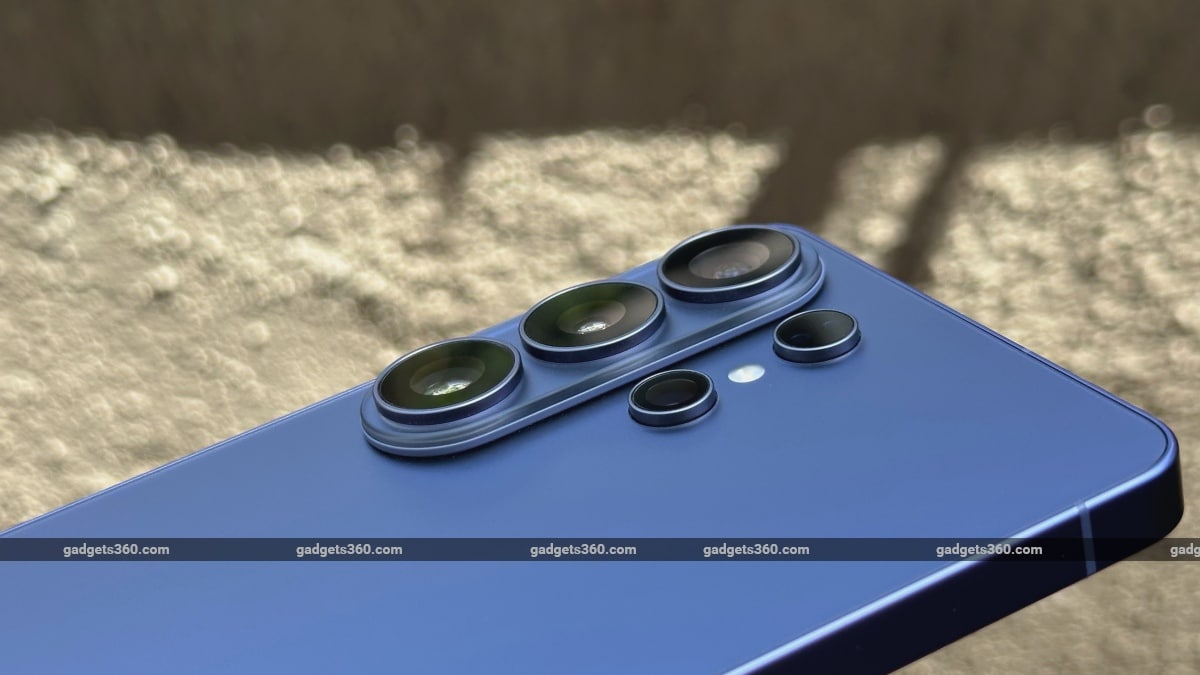
The Samsung Galaxy S26 Ultra comes with the new ambient island camera design that unifies the lenses into a single, polished element, creating a refined, next-level aesthetic.
How durable is the Samsung Galaxy S26 Ultra?
The Samsung Galaxy S26 Ultra is built for strong everyday use with a premium design and durable build. It features Corning Gorilla Armor 2 screen protection and an Armor Aluminum frame.
Is the new Samsung Galaxy S26 Ultra the slimmest flagship from the Samsung Galaxy S series?
Yes, the Samsung Galaxy S26 Ultra is the slimmest Ultra flagship. It has a 7.9mm thickness.
How fast is the new NPU on the Samsung Galaxy S26 Ultra?
The Samsung Galaxy S26 Ultra has an upgraded NPU that is about 39 percent more powerful, helping deliver faster AI tasks, smoother multitasking, and better image processing.
What are the different ways to activate Privacy Display on the Samsung Galaxy S26 Ultra?
In Samsung Galaxy S26 Ultra, the Privacy Display can be turned on for selected apps, during PIN or password entry, or for notification pop-ups. Users can also activate Privacy display from the Quick panel by swiping down from the top of the screen
What is the new mobile Digital Natural Image engine (mDNIe) feature on the Samsung Galaxy S26 Ultra?
The new mDNIe feature improves image processing precision by up to 4 times, helping the display show clearer, sharper, and better-looking visuals
How much time does it take to get up to 75 percent charged on the Samsung Galaxy S26 Ultra?
The Samsung Galaxy S26 Ultra can charge up to 75 percent in around 30 minutes with its 60W fast charging support.
How much time does the battery of the Samsung Galaxy S26 Ultra last?
The Samsung Galaxy S26 Ultra packs a 5000mAh battery designed for all-day use, giving long-lasting power for daily tasks, entertainment, and work.
How is the Nightography on the new Samsung Galaxy S26 Ultra?
The Samsung Galaxy S26 Ultra offers improved Nightography with brighter and clearer low-light photos and videos. It captures strong details and vivid colours even at night.
What is the Space Zoom feature on the Samsung Galaxy S26 Ultra?
The Samsung Galaxy S26 Ultra offers up to 100x Space Zoom with AI-powered features, helping capture distant subjects without losing clarity.
What are the camera-related AI features available on the Samsung Galaxy S26 Ultra?
The Samsung Galaxy S26 Ultra has AI-powered camera tools that include Photo Assist, ProVisual Engine, AI image processing, and smarter selfie enhancement for better photos and videos.
What is the Now Nudge feature available on the Samsung Galaxy S26 Ultra?
The Samsung Galaxy S26 Ultra has a special feature called Now Nudge that intelligently understands what is on your screen. It gives useful suggestions, like adding events to the Calendar, quickly sharing photos, or more
Does the new Quick Share feature on the Samsung Galaxy S26 Ultra also support AirDrop?
Yes, the Samsung Galaxy S26 Ultra Quick Share supports easy file sharing across devices and also works with AirDrop-style sharing experiences for smoother transfers.
What is the new Personal Data Engine feature on the Samsung Galaxy S26 Ultra?
The Samsung Galaxy S26 Ultra’s Personal Data Engine (PDE) powers smarter and more personalised Galaxy AI experiences by understanding your usage and preferences on the device. It keeps your data secure with Samsung Knox, KEEP, and Knox Vault protection
Can Privacy Display automatically turn on in public places?
Yes, the Samsung Galaxy S26 Ultra’s Privacy Display can turn on automatically in public places. You can set it to work based on location, specific apps, or while entering passwords and PINs.
How does the Samsung Galaxy S26 Ultra offer improved AI-powered photography compared to previous Galaxy Ultra models?
The Samsung Galaxy S26 Ultra offers better AI photography with its 200MP camera, improved low-light photos, and smarter image processing. It includes the different AI-powered upgrades like Generative Photo Assist, Creative Studio, Virtual Reflector, Super Steady Horizontal Lock, and Upgraded Low-Light Processing, which gives smoother and more stable output than older Galaxy Ultra models.
Does the Samsung Galaxy S26 Ultra support 8K video recording?
Yes, the Samsung Galaxy S26 Ultra supports 8K video recording at up to 60fps
Can the Samsung Galaxy S26 Ultra capture astrophotography shots?
Yes, the Samsung S26 Ultra captures astrophotography shots with its 1x optical perfection to 100x AI-powered Space Zoom that helps in stabilising your view and enhancing clarity
Does Samsung Notes support AI summaries on the Samsung Galaxy S26 Ultra?
Yes, the Samsung Notes support AI summaries and also help in improving your writing and note-taking skills with automatic formatting and spell checking on Samsung Galaxy S26 Ultra.
Can Bixby control smart home devices on the Samsung Galaxy S26 Ultra?
Yes, Bixby controls smart home devices like TV, AC, and more only when the devices are registered to SmartThings with Bixby on the Samsung Galaxy S26 Ultra.
Can I connect external storage devices to the Samsung Galaxy S26 Ultra?
es, the Samsung Galaxy S26 Ultra supports external storage devices through its USB Type-C port. You can connect USB flash drives, memory card readers, and portable SSDs for easy file access and transfer.
Can Galaxy AI on Samsung Galaxy S26 Ultra help rewrite text messages and emails?
Yes, with Galaxy AI-powered keyboard on Samsung Galaxy S26 Ultra, you can get assistance crafting emails, text messages, notes, social media posts, and captions.
Can the Galaxy S26 Ultra support external displays for gaming?
Yes, the Samsung Galaxy S26 Ultra supports external displays for gaming through screen mirroring and Smart View. You can connect your phone to a compatible TV on the same Wi-Fi network and enjoy games on a bigger screen. Some TVs may need screen mirroring or input settings turned on before connecting.
Is the Samsung Galaxy S26 Ultra suitable for esports players?
Yes, the Samsung Galaxy S26 Ultra is suitable for esports players and competitive gaming. It features a massive high-refresh display, advanced thermals, and optimised hardware for smooth gameplay and stable performance. The phone also offers long battery life with fast charging for longer gaming sessions.
Can I increase touch sensitivity on the Samsung Galaxy S26 Ultra?
Yes, you can increase touch sensitivity on the Samsung Galaxy S26 Ultra for a more responsive screen, especially when using a screen protector.
Can I manually adjust ISO and shutter speed on the Samsung Galaxy S26 Ultra?
Yes, the Samsung Galaxy S26 Ultra’s Pro Mode lets you manually adjust ISO, shutter speed, exposure, and white balance for more control over your photos and video
Does the Samsung Galaxy Samsung S26 Ultra support HDR10 video recording?
Yes, the Samsung Galaxy S26 Ultra supports HDR10 video recording and playback for more vivid colours, better contrast, and improved dynamic range
Does the Samsung Galaxy S26 Ultra support AI voice typing?
Yes, the Samsung Galaxy S26 Ultra supports AI voice typing through Samsung Voice Input and Google Voice Typing.
Does the Samsung Galaxy S26 Ultra support secure enterprise features?
Yes, the Samsung Galaxy S26 Ultra supports secure enterprise features, which include Samsung Knox, Privacy Display, Personal Data Engine, Knox Matrix, and Enterprise Support
Can I pair wireless gaming controllers with the Samsung Galaxy S26 Ultra?
Yes, pairing wireless gaming controllers with the Samsung Galaxy S26 Ultra is possible. You can use an Xbox Bluetooth controller, a PlayStation DualSense controller, or various mobile-specific gamepads for easy gaming.
Does the Samsung Galaxy S26 Ultra support passkeys?
Yes, the Samsung Galaxy S26 Ultra supports passkeys. It allows sign-ins with the help of biometric data like your fingerprint or facial authentication to authenticate your identity without following the traditional way of username and password combination.
Is the Samsung Galaxy S26 Ultra built using eco-friendly materials?
Yes, the Samsung Galaxy S26 Ultra is built using eco-friendly and recycled materials. It uses different recycled materials in both internal and external parts, with recycled content making up about 17.7 percent of the device by weight.
Does the S Pen support Air Actions on the Samsung Galaxy S26 Ultra?
No, the S Pen for the Samsung Galaxy S26 Ultra does not support Air Actions.
Is the Samsung Galaxy S26 Ultra good for business users?
Yes the Samsung Galaxy S26 Ultra is good for the business users considering their different features like Enterprise Security, Built-in Privacy Display, Multitasking and AI, and also long day battery backup.
Can I hide sensitive notifications on the Samsung Galaxy S26 Ultra lock screen?
Yes, you can hide sensitive notifications on Samsung Galaxy S26 Ultra lock screen using Hide Notification Content.
Can I remotely locate the Samsung Galaxy S26 Ultra if it is lost?
Yes, you can easily locate the Samsung Galaxy S26 Ultra if it is lost by the help of SmartThing Find feature.
Can I limit the maximum charging percentage on the Samsung Galaxy S26 Ultra?
Yes, you can limit the maximum charging percentage on the Samsung Galaxy S26 Ultra using the built-in Battery Protection settings.
Does the Samsung Galaxy S26 Ultra support secure biometric authentication?
Yes, the Samsung Galaxy S26 Ultra supports secure biometric authentication via an in-display ultrasonic fingerprint scanner and 2D facial recognition.
Can the Samsung Galaxy S26 Ultra remove unwanted objects from photos automatically?
Yes, the Samsung Galaxy S26 Ultra removes unwanted objects from photos automatically with the help of the new Object eraser tool that lets you instantly remove objects or even people from your photos.
Can Galaxy AI personalise recommendations on the Samsung Galaxy S26 Ultra?
Yes, the Samsung Galaxy S26 Ultra features highly personalised Galaxy AI recommendations, delivered through intelligent features like daily insights, context-aware smart suggestions, adaptive content recommendations, and AI-powered creative tools that tailor experiences to your activities, preferences, and usage patterns.
Can the Samsung Galaxy S26 Ultra run Galaxy AI features directly on-device?
Yes, the Samsung Galaxy S26 Ultra can run several Galaxy AI features directly on-device. Powered by the Snapdragon 8 Elite Gen 5 for Galaxy processor and its upgraded NPU, it handles supported AI tasks locally. This also enables features like Photo Assist, Now Brief, and contextual AI suggestions.
Does the Samsung Galaxy S26 Ultra support seamless ecosystem connectivity with other Galaxy devices?
Yes, the Samsung Galaxy S26 Ultra supports seamless connectivity with other Galaxy devices. It can easily sync with Galaxy phones, tablets, watches, earbuds, and PCs for features like call syncing, file sharing, audio switching, and smart device control.
How does Privacy Display improve data security on the Samsung Galaxy S26 Ultra?
Privacy Display on the Samsung Galaxy S26 Ultra helps protect your personal data by limiting who can see your screen. It makes the display clear from the front but harder to view from the sides. It can also work automatically based on the app or situation.
Can you shoot DSLR-grade videos from Samsung Galaxy S26 Ultra?
Yes, the Samsung Galaxy S26 Ultra is designed to capture DSLR-grade, cinema-quality videos with advanced professional tools built into the camera app. It features the new APV codec, Samsung Log recording, cinematic LUTs, and full manual Pro Video controls for greater creative control. The device also supports high-resolution recording, including up to 8K video and high-frame-rate 4K capture.
Does the Samsung Galaxy S26 Ultra support advanced eye comfort features for long usage?
Yes, the Samsung Galaxy S26 Ultra supports advanced eye comfort features for long usage. It includes Eye Comfort Shield to reduce blue light and adjust screen colours based on the time of day. The display also uses high-frequency dimming and an anti-reflective screen to help reduce flicker for a more comfortable viewing experience
Does the Samsung Galaxy S26 Ultra offer superior video quality for low-light scenarios?
Yes, the Samsung Galaxy S26 Ultra delivers superior video quality in low light because of its upgraded camera system and AI-powered Nightography features that help capture brighter, clearer, and more detailed videos in dark scenes.
What are the major differences between Samsung Galaxy S26 Ultra and Samsung Galaxy S26?
The Samsung Galaxy S26 Ultra has a bigger 6.9-inch QHD display, a more powerful camera setup with a 200MP main Camera and a bigger 5000mAh battery, S Pen support and a faster Snapdragon processor, while the Galaxy S26 comes with a smaller 6.3-inch FHD screen with comparatively less battery power and other options.
What is the All Lens On Prism (ALoP) periscope system on the 50MP telephoto camera on Samsung Galaxy S26 Ultra?
The All Lens On Prism (ALoP) system on the Samsung Galaxy S26 Ultra is a new periscope camera design used in its 50MP telephoto camera. It places the lenses on top of the prism to improve zoom performance in a slimmer camera module. This design allows more light to enter the camera for brighter, sharper photos and better image quality.
Does the built-in S Pen maintain active Bluetooth connectivity?
No, built-in S Pens on Samsung Galaxy S26 Ultra does not maintain active Bluetooth connectivity.
Can the Samsung Galaxy S26 Ultra improve multitasking while using split-screen apps?
Yes, the Samsung Galaxy S26 Ultra improves multitasking with advanced split-screen features. It lets you run up to three apps at the same time by easily dragging and dropping content between apps. You can also save your favourite app pairs for quick access
Is the Samsung Galaxy S26 Ultra suitable for users who want the most advanced Galaxy AI features?
Yes, the Samsung Galaxy S26 Ultra is the ultimate device for users seeking the most advanced Galaxy AI features.
Can the Samsung Galaxy S26 Ultra replace multiple devices for work, gaming, and content creation?
Yes, the Samsung Galaxy S26 Ultra can replace multiple devices for work, gaming, and content creation because of its advanced features, processor, and AI capabilities.
Popular Products FAQs